Smoother operations at your Vietnam site

Approval workflow in Vietnam,
in Japanese, Vietnamese and English
on one system.

E-Document is a document management and ringi (internal approval) workflow system developed for Japanese companies in Vietnam. Electronic seals on PDFs, a three-language interface and flexible deployment support the digitisation of your local operations.

  • Document management and approval workflow in one place
  • Japanese, Vietnamese and English interface
  • Electronic seals and annotation on PDFs
  • Cloud or on-premises, so deployment fits your policy

The brochure is available immediately after you submit the form. To try a demo environment, please contact us.

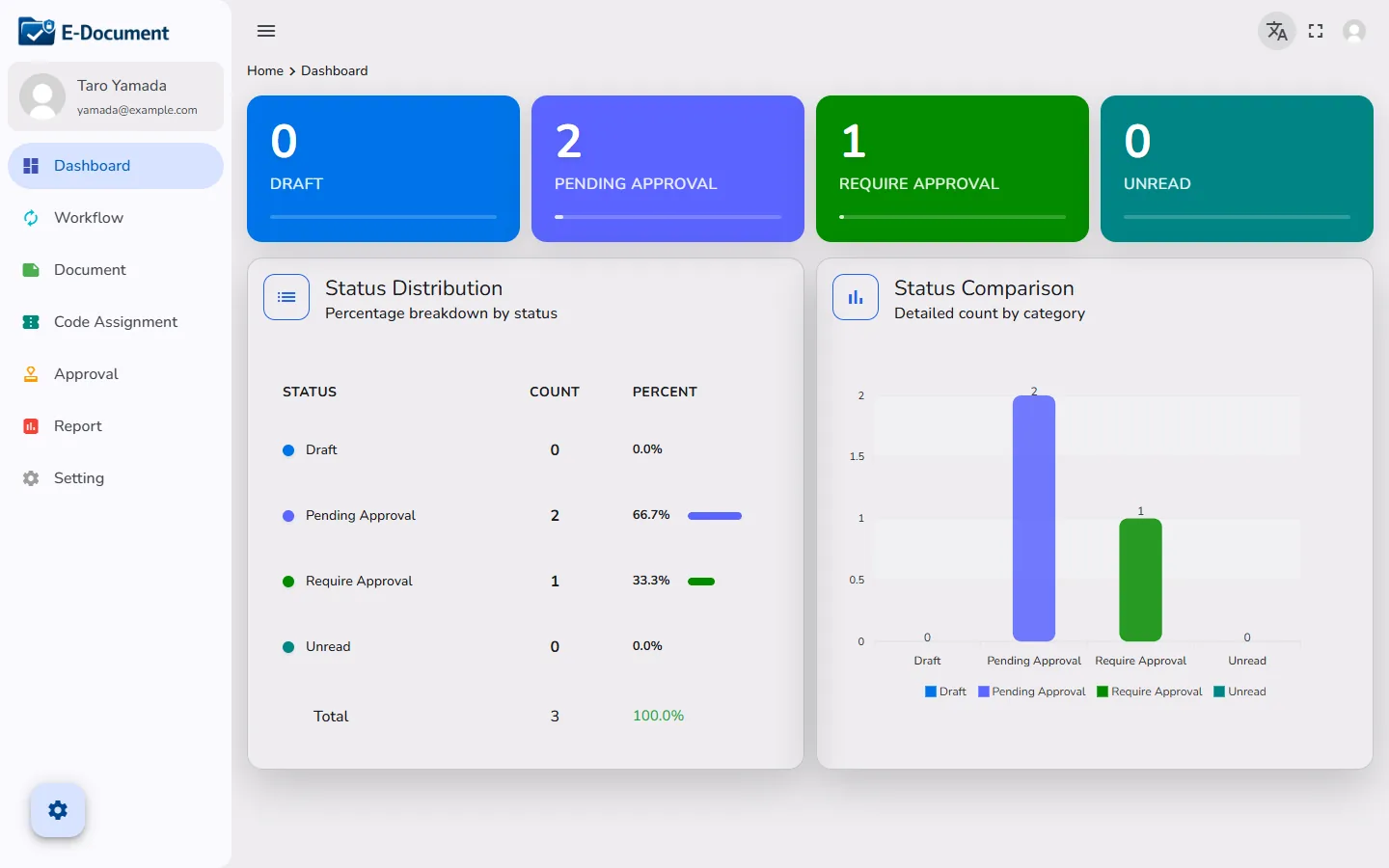
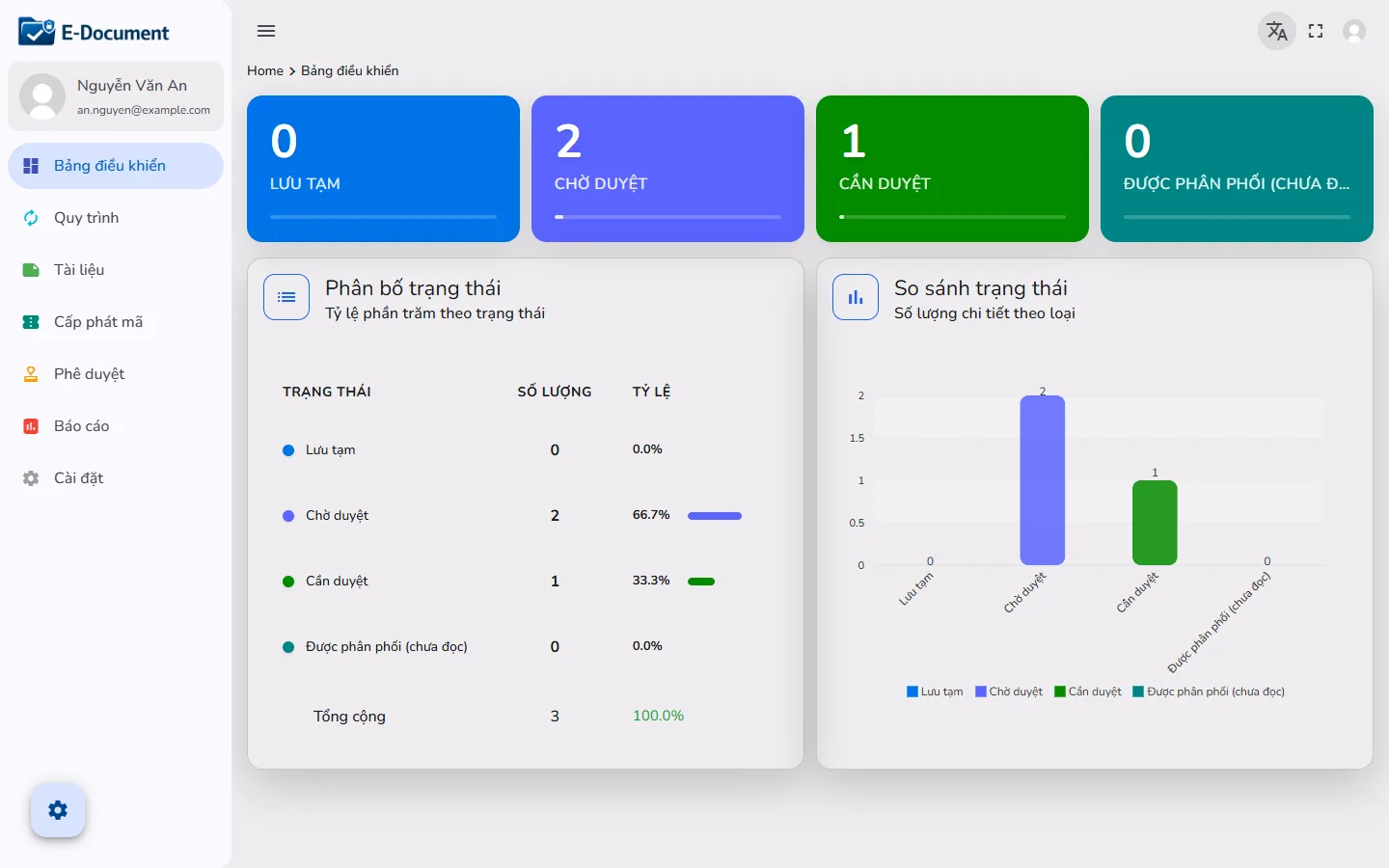
The E-Document dashboard in English, showing counts of drafts, pending approvals, items awaiting your approval and unread documents, with a status distribution chart
  • Japanese companies in VietnamDesigned and developed for them
  • Dependable securityInstallation on your own server supported
  • Local supportFull support in Japanese
  • Japan and VietnamConnected through technology
CHALLENGES

Common approval problems at Japanese companies in Vietnam

Paper and seals, the language barrier, approvals stalled by travel.
Approval requests at a Vietnam site get stuck in ways they do not at the head office in Japan.

  • Paper requests stall while waiting for a seal

    Nobody knows whose desk the document is sitting on, so the applicant walks around the departments to find out.

  • A language barrier between Japanese managers and Vietnamese staff

    Checking the content of a request and explaining why it was returned takes time, and translation consumes more effort than the approval itself.

  • Approvals stop during business trips and home leave

    When the approver is away from their desk nothing moves forward, and the paperwork piles up until they return.

  • Approval by executives at the Japanese head office is also required

    For requests that need a decision from head office, the only option is to send the documents by email and wait for a reply, and each round trip takes days.

  • You do not want confidential documents on an external cloud

    The head office information security policy does not allow contracts and drawings to be stored in a SaaS service.

  • Nobody knows which version is current

    The shared folder is full of "final" and "final 2", and previously approved documents cannot be found.

SOLUTION

Approval workflow and document management in a single system

E-Document handles the whole path from submission to approval, sealing, distribution and storage on one screen.
It answers the problems above with three pillars.

1

Multi-step approval workflow

Assign a department and a person in charge to each step. Choose whether everyone must approve (AND) or any one person is enough (OR), and require password re-entry at approval or specify which step a request is returned to.

2

Document management and distribution

Version history, folders per department and expiry date management. Once approved, documents are distributed by department or user, and you can see who has not read them.

3

Japanese, English and Vietnamese screens

Each user switches their own display language. Japanese staff work in Japanese and Vietnamese staff work in Vietnamese, on the same approval request.

FOR VIETNAM

Designed on the assumption that it will be used on site in Vietnam

This is not a general-purpose workflow system translated into Vietnamese.
It is built on the assumption that Japanese managers and Vietnamese staff work on the same screen.

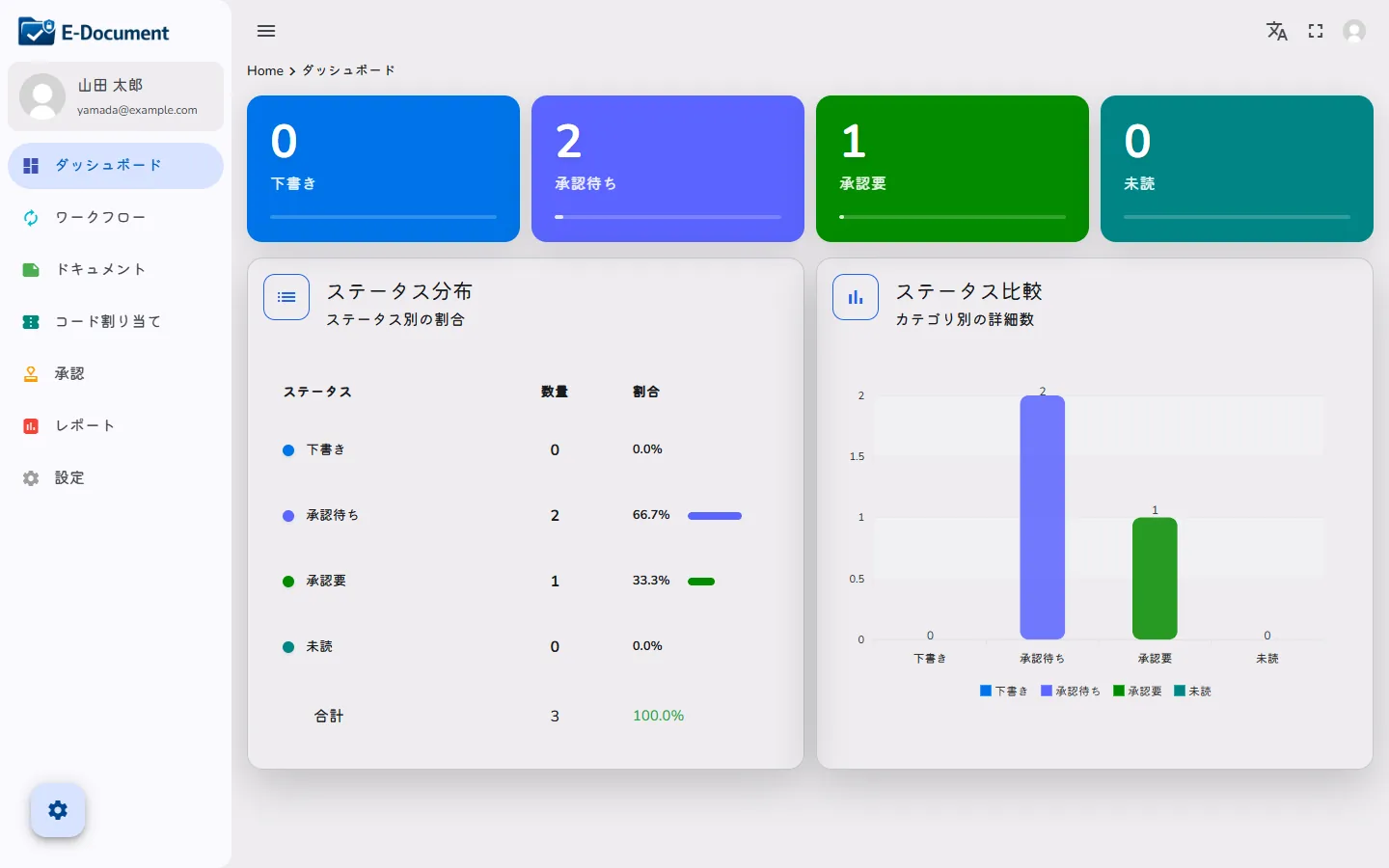
The E-Document dashboard shown on a laptop, in Japanese
The display language is set per user. Japanese staff use the screen in Japanese and Vietnamese staff use the same screen in Vietnamese.
  • Approve the same request, each in your own language

    A request raised in Vietnamese by the applicant is reviewed by a Japanese approver on a Japanese screen. Neither side has to switch to the other's language.

  • Notifications on Vietnam time, summarised at 7:00 each morning

    An email arrives on every approval, rejection and distribution, and at 7:00 each morning a single digest lists everything waiting for your approval.

  • You decide where the data is kept

    You can choose either installation on your own server in Vietnam, or operation on a VPS (cloud) inside Vietnam.

  • Approve from a smartphone, even while travelling

    The screens work in a smartphone browser, so approvals do not stop during business trips or home leave. There is no dedicated app to install.

  • Approvers at the Japanese head office join the same flow

    Because it runs in a web browser, head office executives can be added to approval steps. They open the document straight from the link in the email and apply their seal.

  • Backed by our development base in Ho Chi Minh City

    Developed and maintained at HARO Inc.'s Vietnam base (HARO VN, Ho Chi Minh City). You can discuss changes that fit local business practice.

FEATURES

Main features

From submission to approval, sealing and distribution, on one screen. Everything below is already implemented in the current version.

Approval workflow

Build approval routes that follow your own approval rules

Add steps to each workflow and assign a department and a person in charge (an individual or a group).

  • Choose "all required (AND)" or "only one required (OR)" for each step
  • Password re-entry can be made mandatory at approval, per step
  • On rejection, choose which step to return to and require a reason comment
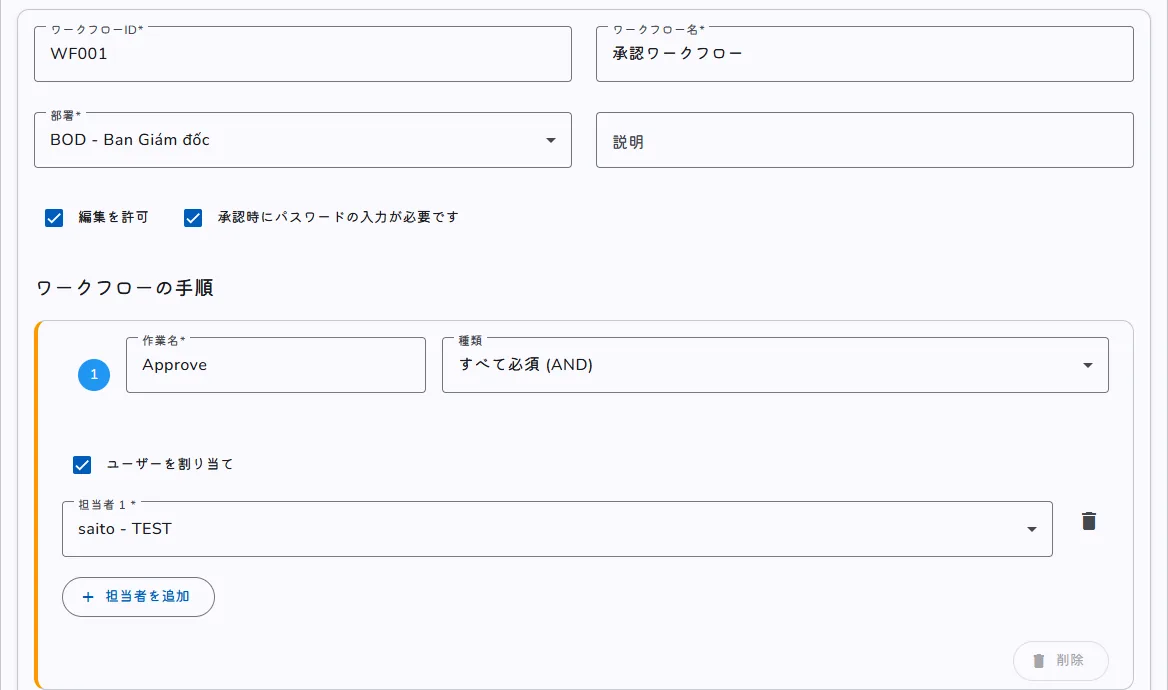
The workflow settings screen, showing the checkbox requiring a password at approval, the step 1 type set to all required (AND), and the assignment of the person in charge
The workflow settings screen. Password requirement, AND/OR and the assignee are set per step.

Electronic seals and PDF editing

Apply your seal directly to the PDF request

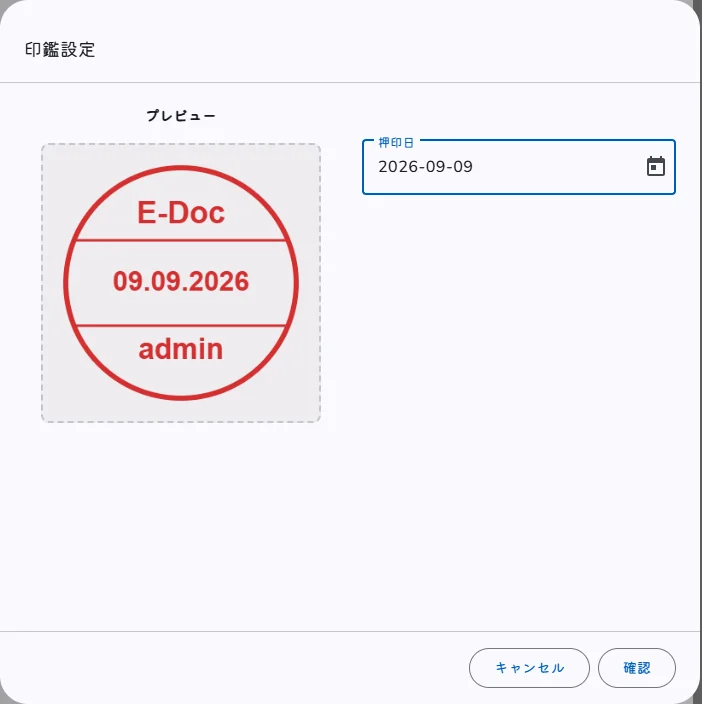
The approval screen opens the PDF in the browser, where the seal registered for each user is placed together with the sealing date. Sealing can also be made a condition of approval.

  • Seal preview and choice of sealing date
  • Pen, text, shapes, arrows and images can be added
  • QR codes and serial numbers can be inserted, and pages rotated
  • Save and download the sealed PDF
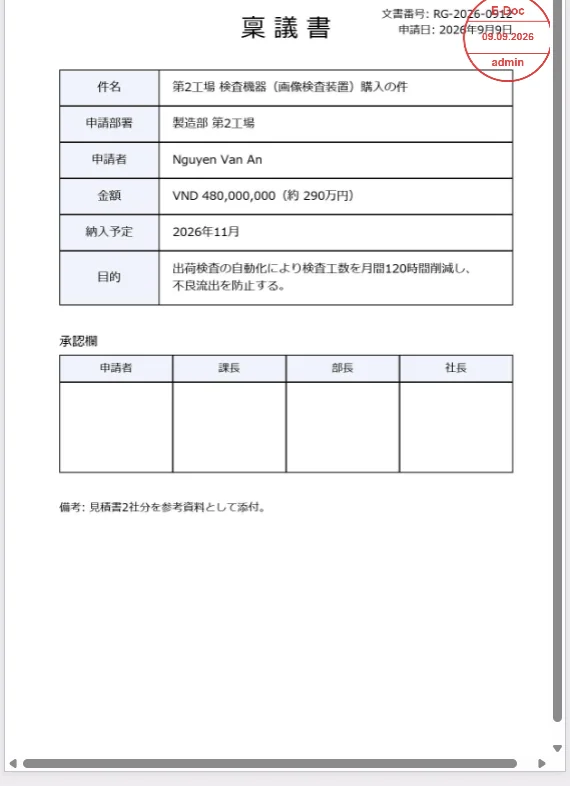
A PDF approval request with a red electronic seal applied
The seal settings dialog, with a preview of the seal and a field for the sealing date
Sealing can be required for approval
Left: the request after sealing. Right: the seal settings dialog.

Document management

The system keeps track of versions, expiry dates and locations

Documents are stored in a folder hierarchy per department, and each revision adds a new version.

  • Version history and reissue. A document being edited is locked so other users cannot overwrite it
  • Attachments fall into three categories: main text (must be read), reference material and disposal report. Multiple files can be uploaded at once (up to 100 MB per request)
  • Expiry and renewal date management, with requests to extend a deadline
  • Requesting and issuing document codes (numbering), and saving drafts
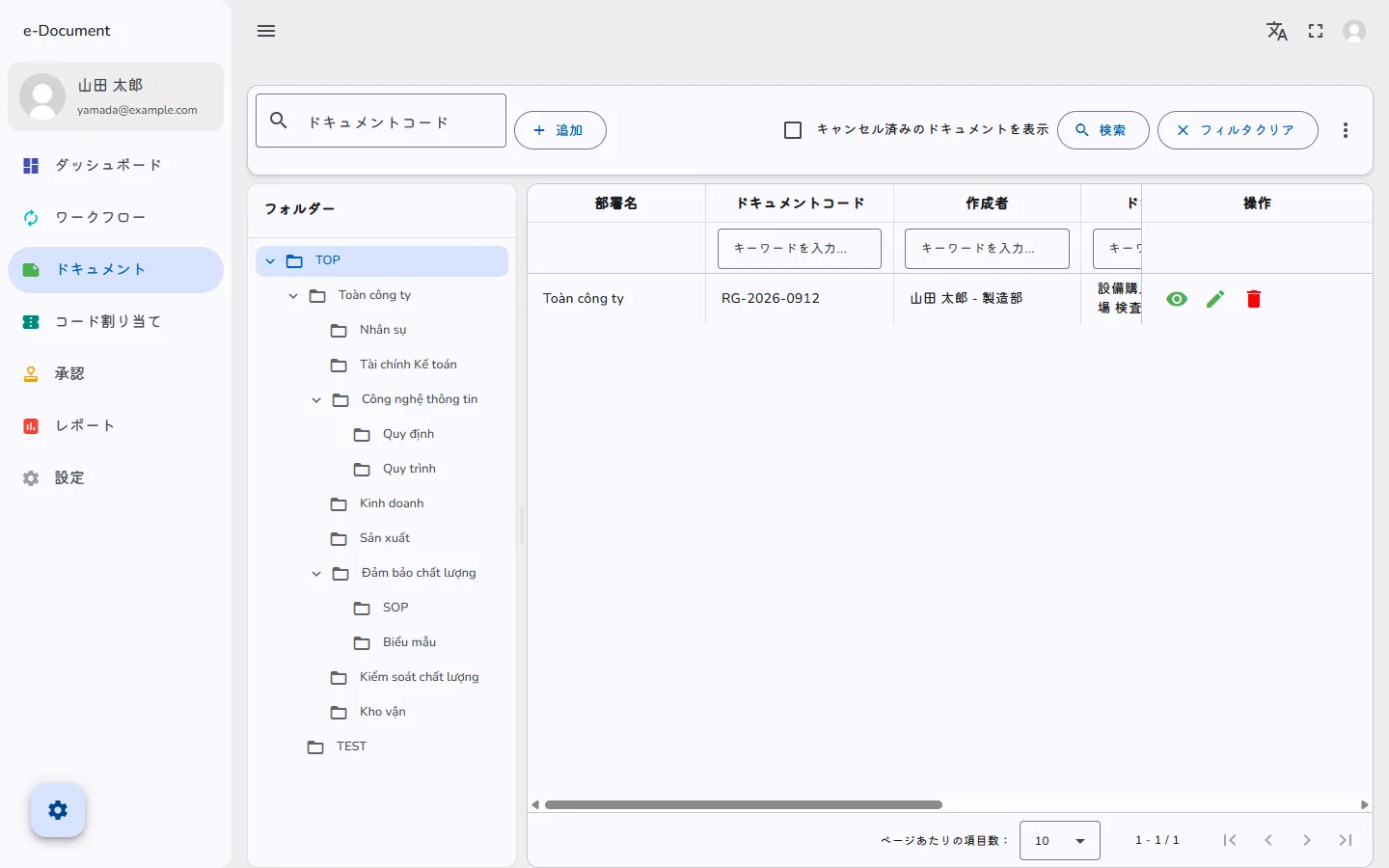
The document list screen, with a folder tree by department on the left and a list of document code, author, effective date, version and status on the right
The document list. The folder tree on the left is tied to departments and shown according to permissions.

Distribution and read tracking

Deliver approved documents to the people who need to read them

Approved rules and manuals are distributed to selected departments and users. You can also distribute to all employees at once.

  • Set "view only" or "can edit" for each recipient
  • Unread documents appear on the dashboard, and read status can be tracked
  • Email notification when a document is distributed
  • Word, Excel, PowerPoint, PDF, CSV and text files preview in the browser (viewable even without Office installed)
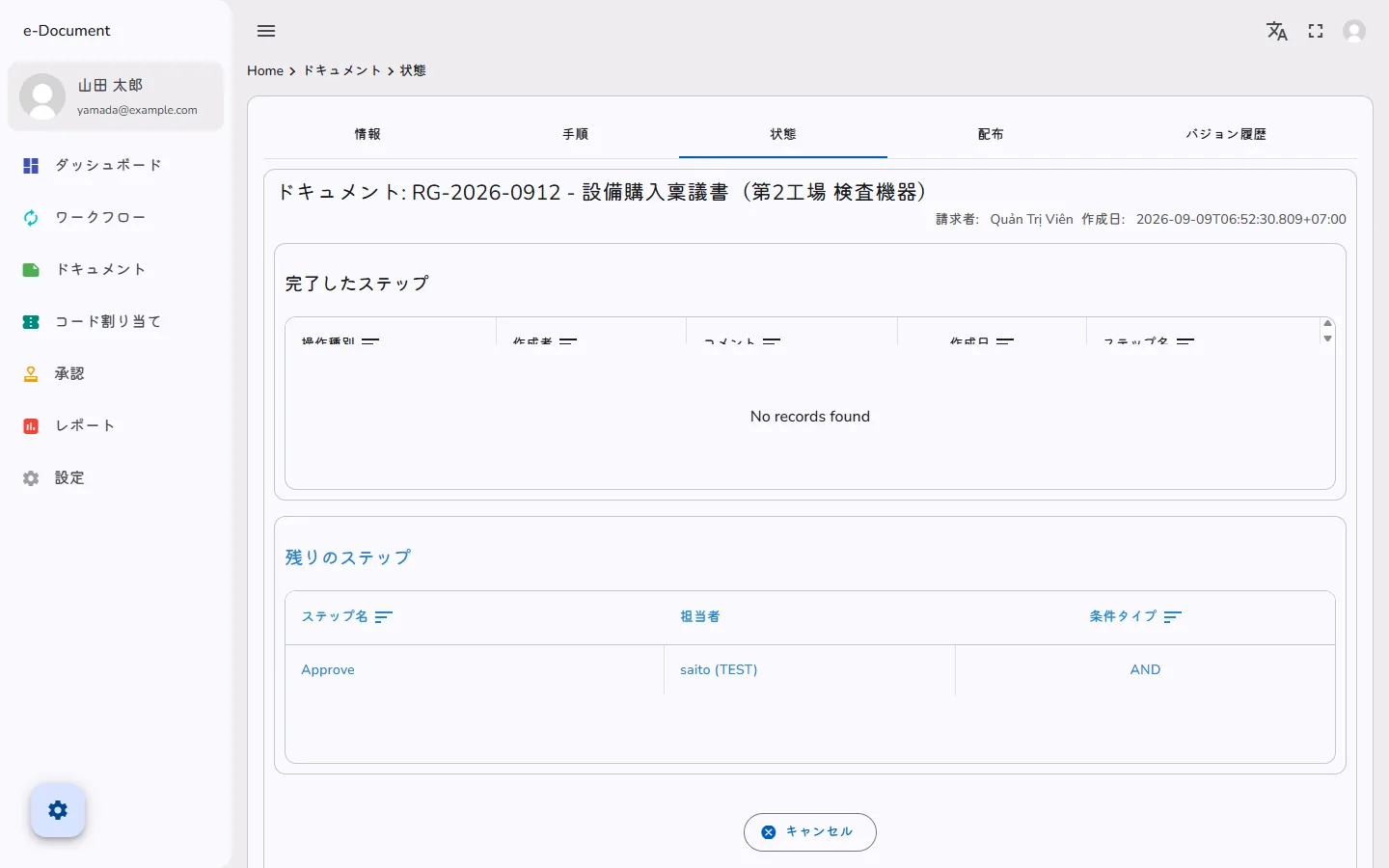
The document status tab, showing completed and remaining steps with the person in charge and the condition type
The document status tab. You can see at a glance which step is waiting and on whom.

Dashboard and reports

Find stalled requests in the numbers

The screen you see right after logging in shows counts of drafts, pending approvals, items awaiting your approval and unread documents, together with the status distribution.

  • Totals for a chosen period and a completion rate
  • Reports that can be filtered by date, type and department
  • Excel export of reports (for audits and head office reporting)
  • Users choose which columns are shown and a light or dark theme
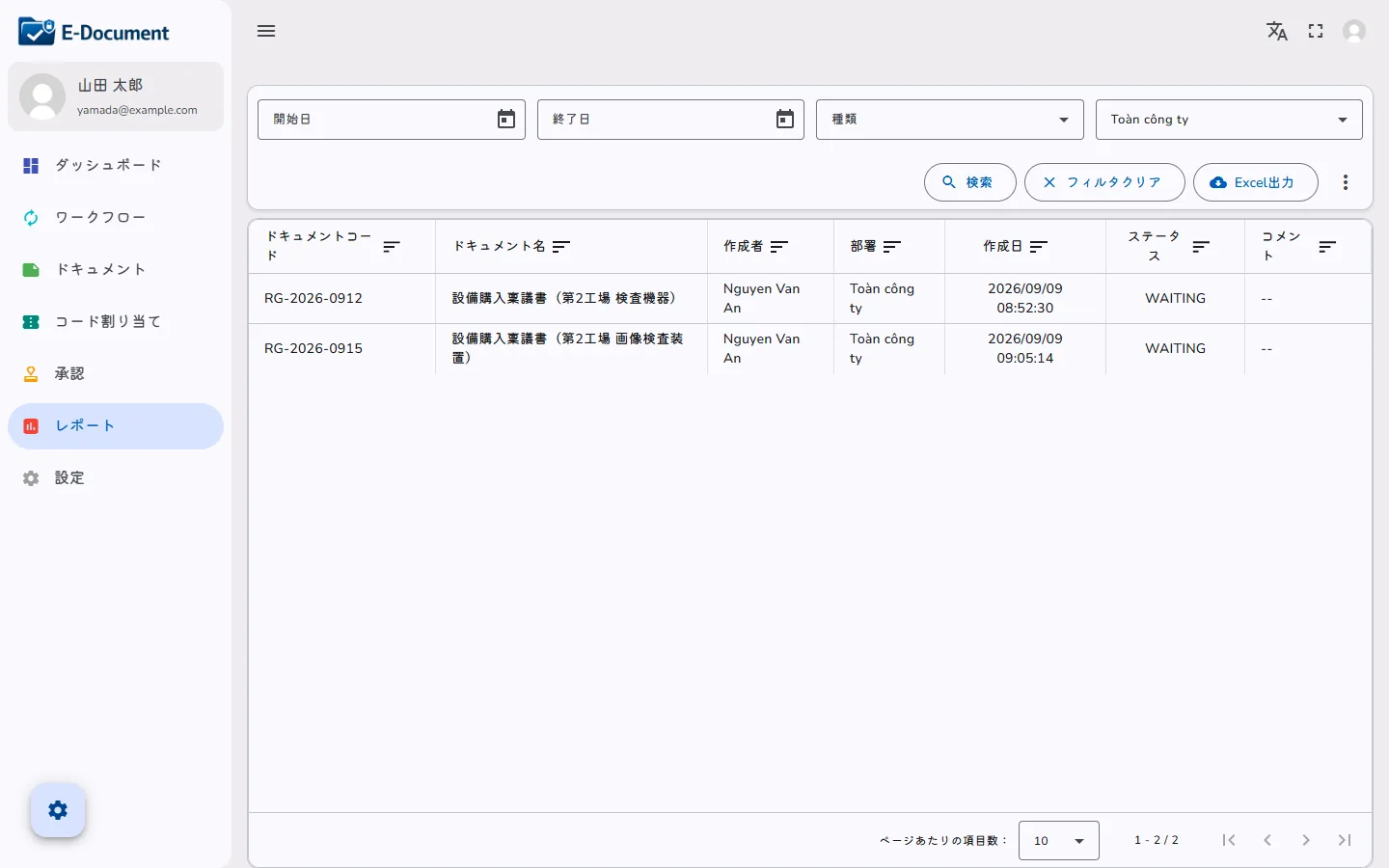
The report screen, with filters for type and department, an Excel export button and a list of document code, author and status
The report screen. Filtered results can be exported straight to Excel.

Notifications and security

Driven by email, protected by permissions

An email arrives on every approval, rejection and distribution, with a link that opens the document directly. At 7:00 each morning a digest lists everything waiting for your approval, and documents expiring during the current month are also notified.

  • Users set for themselves whether to receive notifications and how often (daily or on chosen days)
  • 38 permission types can be assigned to departments and users, and granted to several users at once
  • A password policy (at least 8 characters, three of uppercase, lowercase, digits and symbols) and a forced change at first login
  • Account lock after failed login attempts
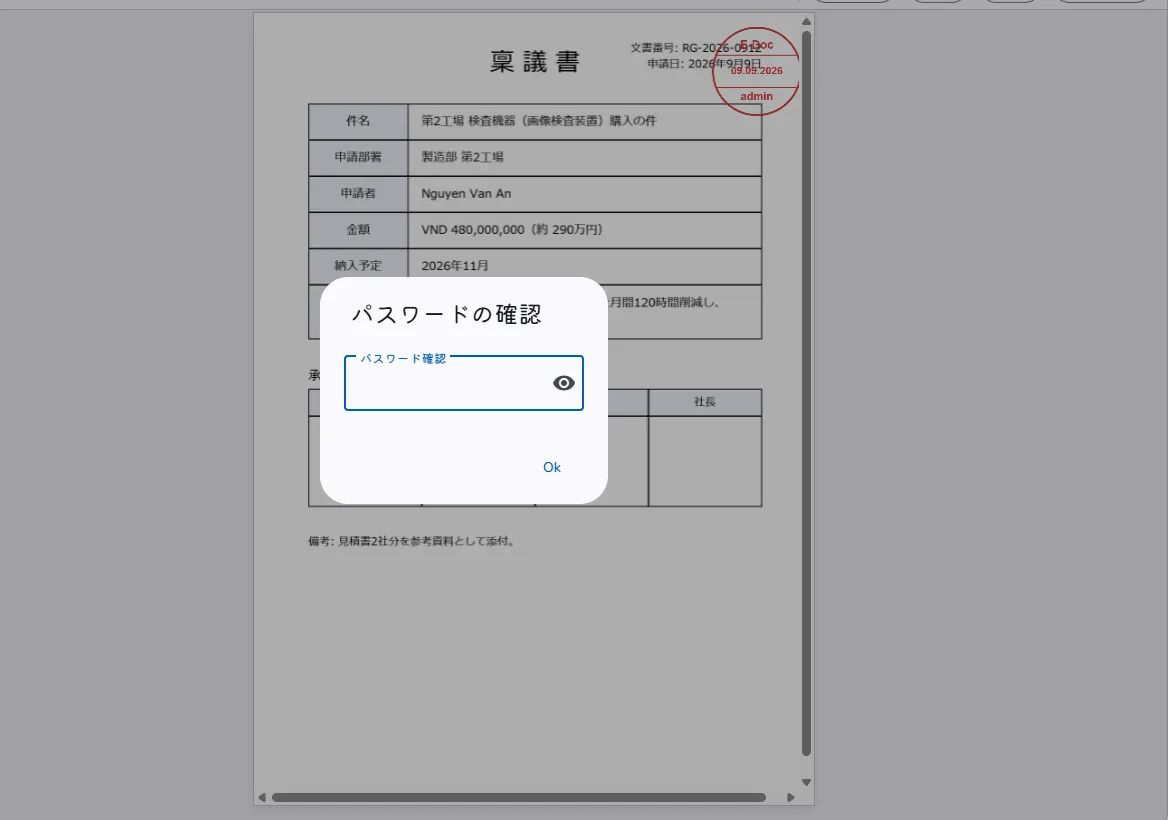
The password confirmation dialog shown at approval, with the password field over the sealed request document
Requiring the password again immediately before approval confirms that the approver acted in person.
PROCESS

From submission to approval and distribution

The order is the same as with paper requests. The difference is that you can always see where a request has stopped.

  1. 1

    Submission

    Attach the request as a PDF or Excel file, choose a workflow and submit. Drafts can also be saved.

  2. 2

    Approval

    The approver receives an email, opens the document from the link and applies their seal. AND/OR and password re-entry are set per step.

  3. 3

    Return

    If there is a problem, choose the step to return to and write a reason. The applicant is notified.

  4. 4

    Distribution and storage

    Distribute approved documents to departments and users. Track unread items while the system manages versions and expiry dates.

DEPLOYMENT

Cloud or on-premises.
You decide where your data is kept

The same system can be installed in the cloud or on your own server.
Choose the option that matches the information security policy of your head office in Japan.

Cloud operation

We build the environment for you on a VPS (cloud) inside Vietnam.

  • You can start without buying or maintaining servers in-house
  • Easy to keep the initial cost down and start with a single department
  • The same screens can be accessed from the head office in Japan

On-premises operation

We build the environment on your own server in Vietnam.

  • Your document data never leaves the company
  • You prepare the server; we handle the build and initial setup
  • Operate in line with your head office's information security policy
  • 38 fine-grained permissions (for documents, workflows, approval, reports and settings)
  • Access control by department and folder
  • Bulk assignment of permissions to several users
  • A password policy and forced password changes
  • Account lock based on the number of failed logins
  • Token-based authentication (JWT)

For our approach to information security, please see our information security policy.

PRICING

Two plans: perpetual licence or subscription

There are two contract types: a perpetual licence and a monthly subscription. For both, the price is determined by the user-count range, and the amount is presented in a quotation.

Item Perpetual licenceOne purchase, permanent use SubscriptionMonthly or annual
How the price is determined A licence fee determined by the user-count range (under 50 / 50-99 / 100-299 / 300-999 / 1,000-2,999 users). 3,000 users or more is quoted individually A monthly fee determined by the same user-count ranges. 3,000 users or more is quoted individually
Maintenance and support No maintenance fee in the first year. From the second year, an annual maintenance fee (15% of the licence fee) covers bug fixes, incident response, enquiries and minor functional adjustments Maintenance and standard support are included in the monthly fee (no separate maintenance fee)
When headcount changes The number of users is checked at the annual maintenance renewal. If it stays above the contracted range, you move up to the next range (paying the difference) The monthly fee is fixed for the contract period. The range is reassessed from the number of registered users at renewal
Initial cost Charged separately. Server setup and initial configuration, approval template setup, initial training and go-live support The same (first time only)
Server environment We build it on your own server or on the cloud you have contracted. There is also an option for us to provide the cloud (monthly) The same
Best suited to Sites that expect long-term use and want to keep the total cost down Sites that want to keep the initial cost down and may review the arrangement in future

Customisation development, data migration support and additional template setup are quoted separately. A special price for first-time deployments currently applies, and it may be revised in future.

CASE STUDIES

Case studies

Four companies in different industries and of different sizes.

Manufacturing, 3,000 employees

Approval time cut from one week to two or three days

Requests that took a week to circulate on paper are completed in two to three days since E-Document was introduced. The time spent on the approval work itself was also halved.

Manufacturing, 1,500 employees

Confidential documents kept in-house with on-premises operation

Operated in full compliance with the internal security policy. Approval and storage were digitised without confidential documents leaving the company.

Construction, 500 employees

Different approval routes per project, handled with workflow settings

Requests whose approvers and stages differ by construction project are handled with per-workflow step settings. Requests from the site can be approved on a smartphone, and the dashboard shows where each request is waiting.

Trading company, 200 employees

Head-office approval built into the Vietnam approval flow

Requests needing head-office sign-off used to go back and forth by e-mail. Now head-office approvers are added as an approval step, and because the same request is handled in Japanese and Vietnamese, translation work and turnaround days were reduced.

ONBOARDING

Deployment steps and support

From the first interview to going live, the typical timeframe is one to two months.

  1. STEP 1 Interview

    We confirm your approval rules, department structure, approval routes and deployment method.

  2. STEP 2 Environment setup

    We install the system in the cloud or on your own server.

  3. STEP 3 Data migration

    We migrate departments, users and existing documents for you, adapting to the data you have on hand, whether Excel files or paper ledgers.

  4. STEP 4 Trial

    You try it on real requests for about a week, and we adjust the settings.

  5. STEP 5 Go live

    Operation begins, with support by email and chat.

Deployment period
Typically one to two months (depending on the scope and the volume to migrate)
Support
Email and chat. An annual maintenance contract is optional
Development and maintenance
HARO VN (Ho Chi Minh City) and the head office in Japan
FAQ

Frequently asked questions about deployment in Vietnam

How long does deployment take?

From the first interview to going live, the typical timeframe is one to two months. It varies with the range of documents covered and the volume of documents to migrate.

Can we migrate our existing documents and data?

Yes. We handle the migration of your existing documents and user data, adapting to the format and volume you have. For large volumes we can also develop a dedicated migration tool.

What support do you provide?

We provide support by email and chat. An annual maintenance contract is available as an option.

Can it run in the cloud?

Yes. It can run on a VPS (cloud) inside Vietnam. You can also choose on-premises operation, installed on your own server.

Can it be customised to match our own approval rules?

Yes. We handle screen changes, additional features specific to your company, and integration with other systems, under a separate quotation.

Can we try it for free?

You can try a demo environment for about one week. Please contact us through the enquiry form and select the option for a demo environment.

Can Vietnamese staff use the system in Vietnamese?

Yes. Each user chooses their display language from Japanese, English and Vietnamese. Japanese managers work in Japanese and Vietnamese staff work in Vietnamese, on the same approval request.

Can it be installed on our own server in Vietnam?

Yes. We build the environment on your own server in Vietnam. You can operate it without your document data leaving the company.

Can approvers at the head office in Japan take part in the approval flow?

Yes. Because the system is used from a web browser, you can assign users at the Japanese head office to approval steps. They can open the document directly from the link in the notification email and approve it.

Can approvals be done from a smartphone?

Yes. The screens work in a smartphone browser, so approvals are possible while travelling. No dedicated app needs to be installed.

Start with the brochure and see how it would work at your Vietnam site

The product brochure (PDF) is available immediately after you submit the form. For a demo environment or a quotation, please contact us.

The brochure covers the feature list, the system architecture and the deployment steps.

Download the brochure (free) Contact us or ask about a demo environment

We are also happy to talk in Japanese.

Brochure Contact